
Jobs and sourcing
Choose your automation level
Set which parts of outreach and pre-screening Finlay handles for a job, and understand the follow-ups and reviews those choices trigger.
Automation is part of Finlay Source. On the Free plan, the job’s Automation tab shows what Finlay Source adds, with the presets you would choose between. See Plans and limits.
Choose a preset
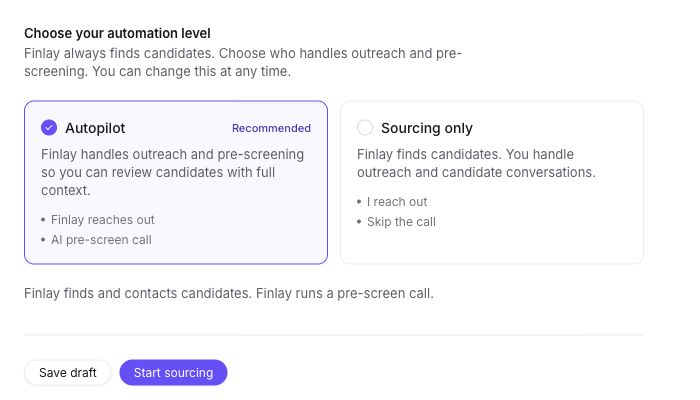
Section titled “Choose a preset”Finlay always sources candidates. The automation setting determines what happens after sourcing.
- Autopilot sends outreach and offers interested candidates a short AI pre-screen conversation. It is the default on Finlay Source.
- Sourcing only leaves outreach and candidate conversations with you. You select candidates, review Finlay’s drafts, and send them from your LinkedIn account. See Reach out to candidates yourself.
Customize the job
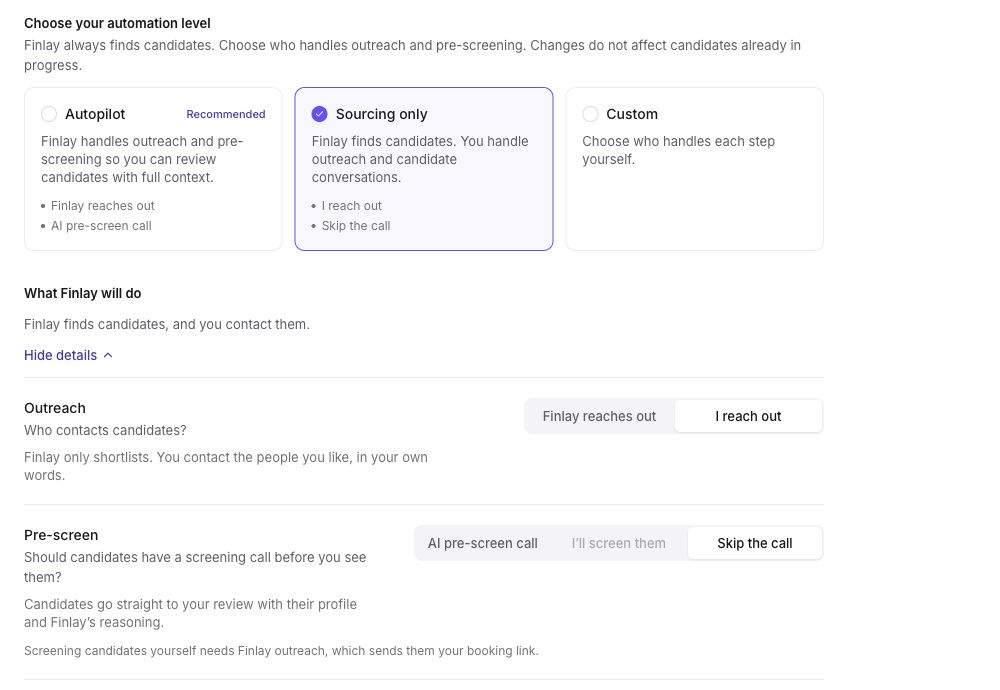
Section titled “Customize the job”On a published job, open Automation to combine the two stages:
- Outreach: let Finlay send LinkedIn outreach, or handle it yourself.
- Pre-screen: use an AI pre-screen call, have the job owner run a call, or skip pre-screening.
Human pre-screening is available only when Finlay handles outreach, because Finlay sends the job owner’s booking link to candidates who reply. The owner must save that link first in Integrations.
Know the consequences
Section titled “Know the consequences”With Sourcing only, you choose candidates, approve outreach drafts and handle candidate replies and follow-ups yourself. With Finlay outreach, Finlay handles first contact and qualifying conversation steps. The selected pre-screen determines whether an interested candidate gets an AI link, the job owner’s booking link or no screening link.
Changing automation affects future activity. It does not rewrite messages or pre-screening already in progress. For the detailed behavior, see Automated outreach and AI pre-screening.